Built for Indian Marketplace Sellers

SnapSeller Meesho Lens: One Extension for Smarter Meesho Selling

SnapSeller Meesho Lens is built by SnapSeller. It is not affiliated with Meesho or with other "Meesho Lens" style extensions.

See what a Meesho product or store is really doing: estimated revenue, lifetime orders, orders per day, listing age, seller details and shipping cost, right on the Meesho page you are already browsing. Then move faster on your own listings with reusable catalog profiles, bulk and one-by-one uploads, Least Price Image and AI-assisted drafts.

Chrome and other Chromium browsers supported.

Free to install • Works on product, store and listing pages • Support when you need help

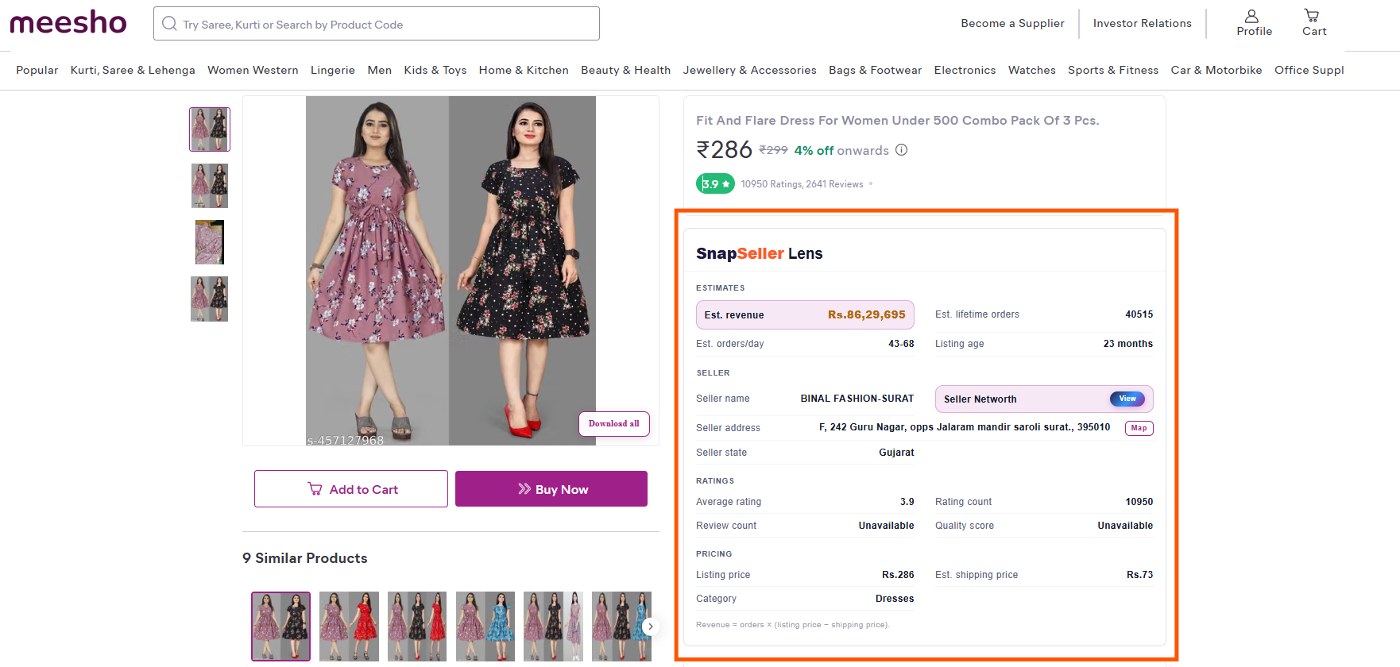
Meesho product page with the SnapSeller Lens research panel showing estimated revenue and orders

What Is SnapSeller Meesho Lens?

SnapSeller Meesho Lens is a Chrome extension for Indian marketplace sellers. On Meesho product pages, seller stores and listing grids it adds a research panel with estimated revenue, lifetime orders, orders per day, listing age, ratings, price and shipping. In the Meesho Supplier Panel it speeds up catalog work with reusable profiles, bulk and one-by-one uploads, Least Price Image and AI-assisted listing drafts. Estimates are directional, so review every value before you decide.

What Can You Do with the Extension?

Save and Reuse Catalog Profiles

Save information you use repeatedly and fill supported catalog fields without typing the same details again. Review the completed fields before continuing because requirements can differ by category.

Benefit: Less repeated data entry across regular catalog work.

Create Catalogs One by One or in Bulk

Use a guided one-by-one workflow when you want more control, or prepare supported bulk catalog work when handling multiple listings. Availability and required fields can depend on the current Meesho workflow and category.

Benefit: Choose the workflow that fits the size of the task.

Prepare a Least Price Image

Use the Least Price Image workflow to prepare supported product-image variations for catalog work. Always check image quality, marketplace requirements and the final preview before upload.

Benefit: Keep image preparation inside the same seller workflow.

Learn how to find the lowest Meesho shipping image.

See Estimated Revenue and Orders on Any Meesho Page

Open a product, a seller store or a category and the SnapSeller Lens panel shows estimated revenue, lifetime orders, orders per day, listing age, seller details, ratings and shipping. Every value is labelled as shown by Meesho, calculated, estimated or unavailable.

Benefit: Spot winning products and study competitors in seconds, without spreadsheets.

Create Listing Titles and Descriptions with AI Assistance

Generate a starting draft for supported listing titles and descriptions, then review and edit it for product accuracy, category rules and natural language before publishing.

Benefit: Reduce drafting time without giving up human review.

Keep Useful Catalog Workflows Together

Use catalog capture, profile backup and related seller tools from one extension instead of switching between separate apps.

Benefit: Spend less time switching between unrelated tools.

How Does SnapSeller Meesho Lens Work?

1. Install and Sign In

Add SnapSeller Meesho Lens from the Chrome Web Store (Chrome and other Chromium browsers are supported) and sign in with your SnapSeller account.

2. Open a Meesho Page

Browse any Meesho product, seller store or listing page to see the research panel, or open the Supplier Panel to use the catalog tools.

3. Review the Numbers or the Output

Read the estimates and their labels, or select a catalog tool and check the generated values, image or file before you use it.

Install the extension from the Chrome Web Store, then open any Meesho product, store or listing page and the SnapSeller Lens panel appears with its estimates. In the Supplier Panel, choose the tool for your task and review the result before you submit.

How Does the Product Research Panel Help?

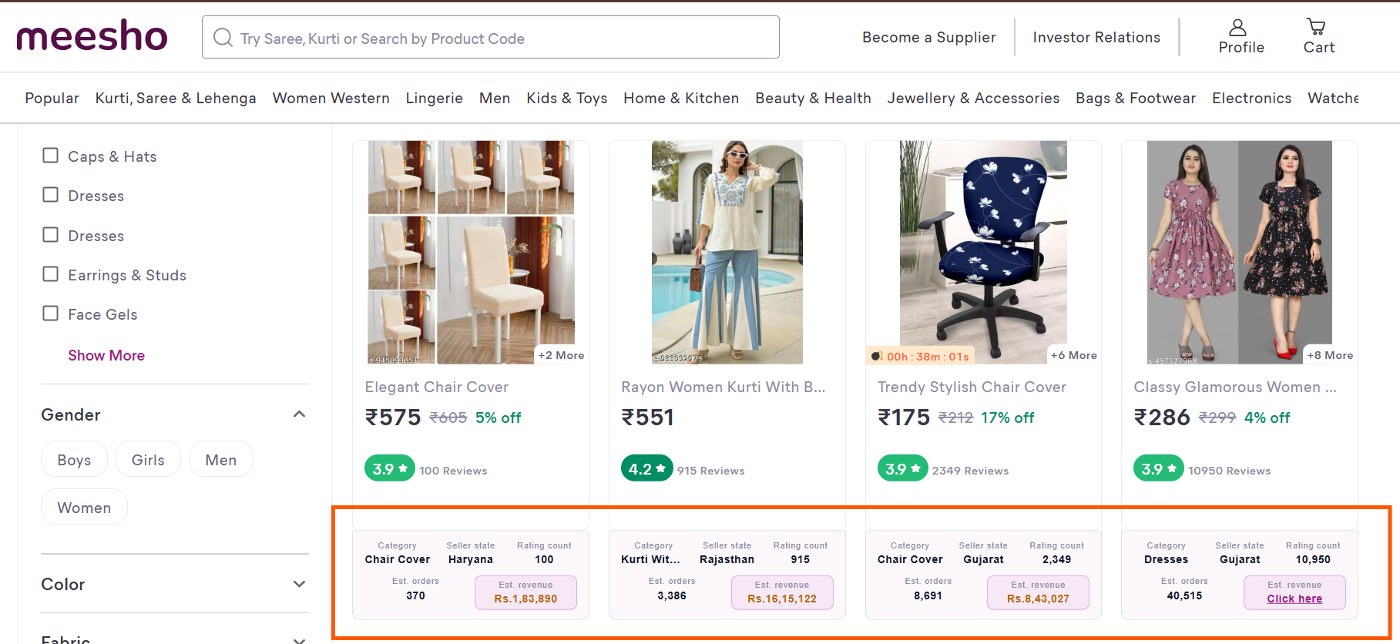
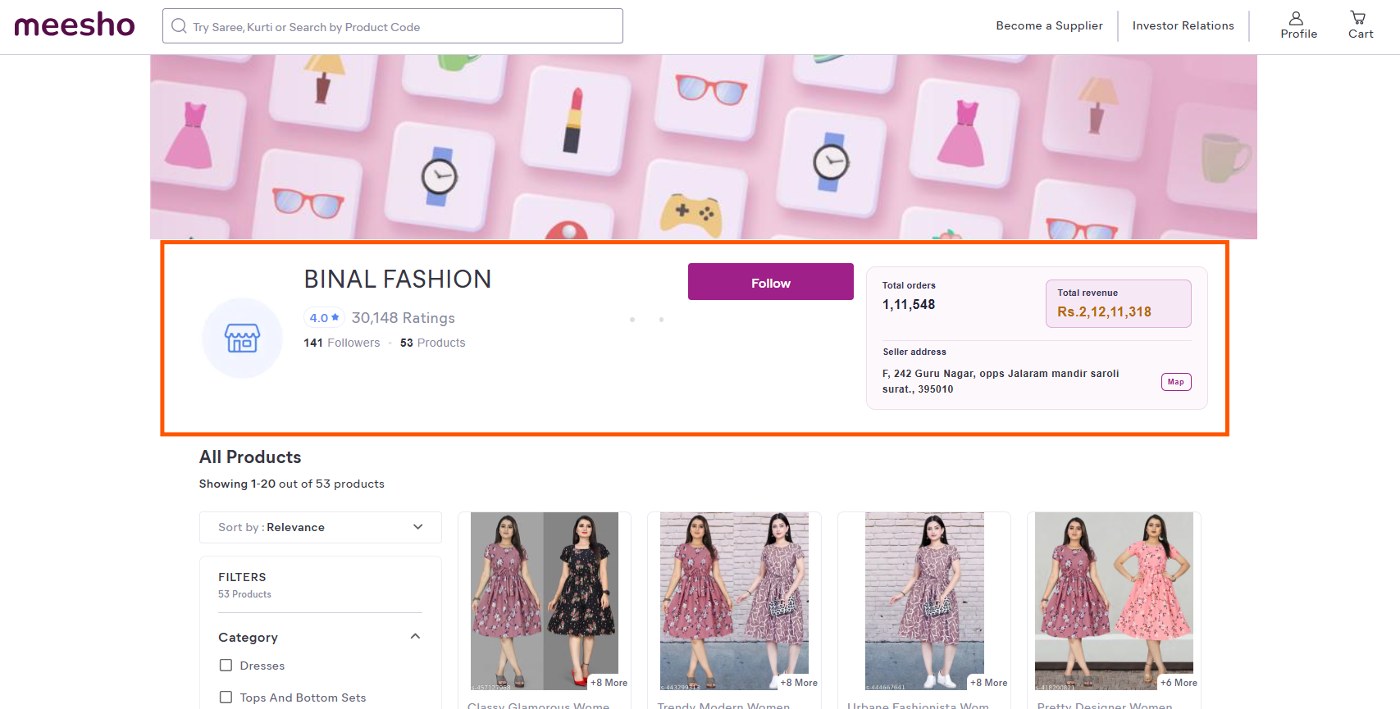
The research panel adds a SnapSeller Lens card to Meesho pages. On a product page it shows estimated revenue, lifetime orders, orders per day and listing age together with the seller, ratings, listing price and estimated shipping. On a seller store page it shows the store's total orders and total revenue beside the seller address. On category and search pages every product card gets its own category, seller state, rating count, estimated orders and estimated revenue, so you can compare products without opening each one. It is a research aid, not a promise that a product will sell or stay profitable.

  • Estimated revenue, lifetime orders and orders per day for a product
  • Listing age, seller name, seller address and seller state
  • Average rating, rating count, listing price and estimated shipping price
  • Total orders and total revenue for a seller store
  • Category, seller state, rating count, estimated orders and estimated revenue on every product card in a listing

You can also calculate your Meesho profit after reviewing the product signals.

Meesho listing page where every product card shows SnapSeller estimated orders and revenue
Estimates on every listing card

What Data Is Shown, Calculated or Estimated?

Every value in the panel is labelled by its type. “Shown by Meesho” means the value was available on the page. “Calculated” means SnapSeller derived it from available inputs, for example revenue = orders × (listing price − shipping price). “Estimated” means it is a directional model that may differ from actual seller or marketplace records.

LabelMeaning
Shown by MeeshoAvailable from the supported page or its page-level data
CalculatedDerived by SnapSeller from available inputs
EstimatedA directional modelled value, not official marketplace data
UnavailableSnapSeller could not reliably display the value

Permissions, Privacy and Important Limitations

SnapSeller Meesho Lens asks only for the browser permissions its released features need, and the Privacy Policy lists them. The extension never places orders or publishes changes on its own; anything that changes your Meesho account starts with your click.

  • Storage: saves your settings and catalog profiles in your browser.
  • Access to supported Meesho pages: lets the extension show the research panel and work inside the Supplier Panel.
  • Cookies: reads your signed-in Meesho session so uploads run under your own account.
  • Downloads: saves the sheets and files you ask for to your device.
  • Side panel and debugger: open the SnapSeller side panel and run limited automation on supported Meesho pages when a workflow needs it.

Important limitations

  • Meesho may change its pages, forms or requirements.
  • Some values or tools may be unavailable on unsupported pages or categories.
  • Estimated research values can differ from actual marketplace records.
  • AI-generated content can contain errors and requires seller review.
  • SnapSeller does not guarantee catalog approval, product demand, sales, profit or ranking.
  • Users remain responsible for marketplace compliance and final submissions.

SnapSeller is an independent seller productivity product and is not affiliated with, endorsed by or sponsored by Meesho.

Read the Privacy Policy before installation.

See SnapSeller Meesho Lens in Action

Real Meesho pages with the SnapSeller Lens panel switched on. Estimated values are directional research signals, not official Meesho records.

Seller store insights

Open any Meesho store and see its total orders and total revenue at a glance, next to the follower count, ratings and seller address.

Meesho seller store page with the SnapSeller total orders and total revenue card highlighted

Research panel on the product page

A SnapSeller Lens card sits under the price with estimated revenue, lifetime orders, orders per day, listing age, seller details, ratings, listing price and estimated shipping.

Meesho product page with the SnapSeller Lens research panel showing estimated revenue and orders

Estimates on every listing card

Browsing a category or search results? Each product card shows its category, seller state, rating count, estimated orders and estimated revenue, so you can compare products without opening each one.

Meesho listing page where every product card shows SnapSeller estimated orders and revenue

Frequently Asked Questions

What is SnapSeller Meesho Lens?

SnapSeller Meesho Lens is a Chrome extension for Indian marketplace sellers. It adds estimated revenue, orders and seller details to Meesho product, store and listing pages, and it speeds up seller workflows such as reusable catalog profiles, bulk and one-by-one uploads, Least Price Image and AI-assisted listing drafts.

Is Meesho Lens only a product research tool?

No. Product research is one important feature, but the extension also supports seller-side workflows such as profile autofill, one-by-one or bulk catalog preparation, Least Price Image and AI-assisted listing drafts.

How do I start using the extension?

Install SnapSeller Meesho Lens from the Chrome Web Store, sign in and open a Meesho page. Browse a product, store or listing to see the research panel, or open the Supplier Panel and choose a catalog tool. Check every generated value, image or file before you use it.

Which Meesho pages does SnapSeller Meesho Lens support?

The research panel works on Meesho product pages, seller store pages and listing pages such as categories and search results. Catalog tools work inside the Meesho Supplier Panel. If Meesho changes its pages, a value can show as unavailable until the extension is updated.

Are product-research numbers official Meesho data?

Not all of them. Every value is labelled as shown by Meesho, calculated, estimated or unavailable. Calculated and estimated values are SnapSeller outputs and are not official Meesho sales, order, profit or return records. Use them as directional research, not a guarantee.

How are estimated orders and revenue calculated?

SnapSeller models estimated orders from the signals available for a listing and works out estimated revenue as orders × (listing price − estimated shipping price). They are meant for comparing products and stores, and they can differ from the seller's real numbers.

Can SnapSeller automatically publish a catalog for me?

SnapSeller can assist supported catalog workflows, but you review the final product details, category fields, images, pricing and generated content before submission. It does not promise catalog approval, because Meesho's requirements and checks remain outside SnapSeller's control.

Does the AI listing feature need human review?

Yes. AI-assisted titles and descriptions are drafts. Check product facts, spelling, category requirements, restricted claims and natural language before publishing, and never submit content that is inaccurate or inconsistent with the actual product.

Why does the extension need browser permissions?

Permissions let the released features work on supported pages, save your settings and profiles and download the files you request. The Chrome Web Store listing and the Privacy Policy explain each permission.

Is SnapSeller Meesho Lens an official Meesho extension?

No. SnapSeller is an independent seller productivity product and is not affiliated with, endorsed by or sponsored by Meesho. Marketplace names are used only to explain compatibility and the workflows the extension is designed to support.

What should I do if a tool stops working after a Meesho update?

First refresh the page, confirm that the extension is updated and retry on a supported page. If the problem continues, contact SnapSeller Support with the page type, browser version and a redacted screenshot. Do not share passwords, OTPs or sensitive customer information.

Do More Meesho Work with One Extension

Use SnapSeller Meesho Lens to research products and simplify supported catalog workflows. Install the extension, choose the tool you need and review every result before submission.

Add to Chrome